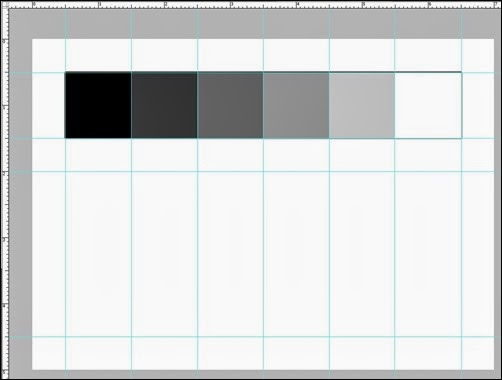
Create a new document with a resolution of 300 DPI, with a size of 5 X 7 inches.
Using the ruler, setup 6, 1 inch squares, 1/2 inch from the edge.
Create a new layer, label it Reference Layer, and fill in each square with the appropriate values.

It should look something like this.
In a new layer, label it Blend Layer, create a rectangular value scale 1/2 inch below the top one.


| NEW VOCAB |
    Umbra – (Latin for "shadow") The area completely obscured by object or the “Hard” shadows Penumbra – The area partially obscured by object or the “Soft” shadows Core Shadow - Specular Highlight - This is a reflection from a light source and is the bright spot of light that appears on the surface of a 3d object. The smaller the highlight the shinier the surface, the larger the highlight the more the surface defuses the light. Reflected Light – Is a faint light reflected or bounced back on the object from the surfaces surrounding it. Mid-Tone – The tonal value mid-way between the highlight and shadow. Sometimes referred to as halftone. Value – The gradation of tone from light to dark or of color luminosity |


Graded Assignment: Using the tools taught in class, remove the background from the this image, showing the Zebra only - CLEANLY.![zebra05%25255B4%25255D[1]](https://blogger.googleusercontent.com/img/b/R29vZ2xl/AVvXsEium41G3YoZO8zG252zByPvA7RrubC4HrMPdAgoOnqk4N82LkO2HOWMrq14AUjn0P8Hp03Y36ue9QLb31udjfGjHPPVmXg9wVbAvIF1vqztxgxp8xexQO5gC8_NLCnno6D2J7QhWjON9mI/s1600-h/zebra05%252525255B4%252525255D%25255B1%25255D.jpg "zebra05%25255B4%25255D[1]")


It is all about Composition! Rule of Thirds, Movement, Triangulation . . . How does your eye move throughout the image . . .

Example
*This tutorial gives you an idea of what you will be doing . . . http://www.tutorialmagazine.com/tutorials/view/create_a_haunted_house_in_photoshop_10
And another one . . . http://www.tutoriallounge.com/2010/07/matte-painting-tutorial-of-tajmahal-using-photoshop/
And . . . https://tutsplus.com/tutorial/apocalyptic-city-street/?WT.mc_id=premium_psdtuts_ed
And . . . http://www.3dtotal.com/index_tutorial_detailed.php?id=372#.UVRWojeyKzE
And . . . http://www.3dtotal.com/index_tutorial_detailed.php?id=767#.UVRXUzeyKzE
Project Completion (50%)
is incomplete and contains many unfinished elements.
is incomplete and contains some unfinished elements and little evidence that project content supports stated objectives.
is incomplete and contains several unfinished elements, some evidence that project content supports stated objectives.
is completely finished and clear evidence that project content supports stated objectives.
Composition's Quality of Manipulation & Editing (20%)
is inappropriate and/or editing is poor in quality.
is appropriate and/or editing is poor in quality.
is appropriate and/or editing is good in quality.
is of high quality and/or editing is excellent in quality.
The Work's Originality (10%)
is a minimal collection or rehash of other people's ideas, images and inventions. There is no evidence of new thought.
is an extensive collection and rehash of other people's ideas, images and inventions. There is little evidence of new thought or inventiveness.
shows some evidence of originality and inventiveness. While based on an extensive collection of other people's ideas, images and inventions.
shows significant evidence of originality and inventiveness. The majority of the content and many of the ideas are fresh, original, and inventive.
Depth & Breadth of Project Content (10%)
No evidence that higher level thinking skills were used in the creation of this project.
Little evidence that higher level thinking skills were used in the creation of this project.
Some evidence that higher level thinking skills were used in the creation of this project.
Clear evidence that higher level thinking skills were used in the creation of this project.
Knowledge of Software (10%)
is not evident. Tools were used incorrectly.
is evident. Some of the tools were used correctly.
is evident in much of the project. Majority of the time, tools were used correctly.
is evident throughout the project. Majority of the time, tools were used correctly.
Possible House Types to Google?
Victorian House
Gothic Revival
Italianate
Renaissance Revival house
Queen Anne
Richardsonian Romanesque
Folk Victorian
Colonial Revival
Neoclassical house
French Revival house
Second Empire
THE ULTIMATE GOAL
You are to create a finished logo and package design for a children’s energy drink.
PROJECT BACKGROUND
You are an advertising designer and your client is roc•et. A unique product, roc • et is the first energy drink aimed at elementary school kids. Just like the big kids who have become dependent on high-calorie, high caffeine energy drinks like Red Bull, Monster, Rockstar and others — now little kids can enjoy a rush of energy in a juice box...just for them!
Assignment: Your job will be as follows: conceive, design, and execute a logo for roc • et. First, create a logo for the drink. The required text for the logo is “roc • et”. Logo design may be in full color and must not be a strictly typographic solution (it must incorporate some form of a graphic or illustration). Your logo design for this part can be any shape or size, but for the purposes of this project, your thumbnails should fit in at least a 4" square. Your logo thumbnails should be NO LARGER than 4". Please remember, this DOES NOT mean that your logo should be square. If you choose to do a rectangular or oval shaped logo, you should adjust the size of your logo thumbnails accordingly. Above all, PACE YOURSELF. The logo should represent the idea of an energy drink aimed at kids in a fun, energetic way. It should communicate instantly that kids are the target market. To this end, we are asking you to be as creative as possible in the time allotted. You will notice that we DID NOT supply you with a slogan or tag-line. You are expected to come up with one. Also, should there be a mascot for the drink? A cartoon character? A celebrity endorsement? You decide. This is the creative portion of the competition. BE CREATIVE. Show us your absolute best ideas. All images must be original in design.
Second, you will create a full color package design. Using the template provided show us what the front of your juice-box type package will look like Do not worry about ingredients or nutrition information on the side of the box. Use the template as provided. How will you make your design fit into the 3-D format? Can it be done in Illustrator? Can it be done in Photoshop? It is your job to use your proficiency with the computer, and your mastery of the programs to make it happen. If we told you how to do it....it wouldn't be much of a contest would it? Again, your design should communicate quickly and effectively. It should make kids scream in the grocery store until their mom gives in and buys the stuff. Show us how creative you can be with it.
Your package design must:
• Incorporate the logo you have created
• Include some sort of slogan or tag-line
• Anything that makes your design REAL or BELIEVABLE. (web address, etc.)
Before you begin work on the composition on your computer, you must complete thumbnails.
SAVE the Package as your first name + “_” + second name + “_” + the word “logo”.
Keep an eye on the time. PACE YOURSELF! The key to all of this is to finish in the time allotted.
Color: Full-color
Size: See instructions above for logo guidelines. Box template is provided
UNIT QUESTIONS:
How does design play a role in advertising?
How does advertising affect society?
PURPOSE
To evaluate each ones preparation for employment and to recognize outstanding students for excellence and professionalism in the field of advertising design.
Time: 2 weeks
Subject: Logo Design and Package Design
Client: roc•et
Procedure:

Download Full Size Image from MYP Resources on COLE.

*Adapted from a SkillsUSA National Contest.
WRITE: Before you do anything, you must fully understand what the task is, so that you are heading in the right direction. You don’t want to start creating a project and realize that it is not answering the task that you were assigned. (Assign a label of ‘TheProblem’ and ‘InitialResearch’)
SKETCH: After reading the problem / prompt, take out a clean piece of paper and sketch and/or write-up your initial thoughts and ideas. Scan and post in your Initial Research. (Assign a label of ‘InitialResearch’)
RESEARCH: Collect / research reference images, current designs, inspirational, blueprints etc. Basically find as many references as you need, which is at least 20+. I call this phase, the “Virtual Cork Board” and have found that the best way to do this is to create a Pinterest page with all your resources. This is not only a dynamic collection of resources, but it also retains the source information for later documentation. (Assign a label of ‘InitialResearch’)
Here is a great Pinterest pinboard resource for advertising design ideas . . . << Here >>
ORGANIZE: Create a mind map that will help guide you for the prompt / problem. Create a mind map that explores 3+ design options for the project. Each design branch should fully explore design characteristics and specifications. (Assign a label of ‘InitialResearch’)
(Optional) If you come up with a great design that might not fully meet the specifications completely, share it with them anyways. Create a 4th branch with this optional design.
SKETCH: Design several thumbnail sketch pages of possible product design. For each possible design, create a page of thumbnail sketches based on each of your designs from your idea map. (Assign a label of ‘Design’)
Here are some thumbnail examples, some are more elaborate than others. Don’t be intimidated the examples, these are just supposed to be light sketches.
Examples
SKETCH: Create 3+ detailed sketch based on your thumbnails, specifications, and mind map. Basically you are draw 3+ detailed sketches where are more detailed version of your best thumbnail designs. You may have multiple pages . . .
Here are some thumbnail examples, some are more elaborate than others. Don’t be intimidated by these examples, these are from professionals or post-secondary students.
DRAW: Create a finished Marketing Concept Sheet for your design (include orthographic views)
Here are some Marketing Concept Sheet examples, some are more elaborate than others. Don’t be intimidated by these examples, these are from professionals or post-secondary students, but it will give you an idea of what I am looking for.